Symly.ai
Overview
Symly.ai is an AI math tutor for handwritten homework. Upload a photo of a student's working,
and the app extracts the math, maps it to spatial regions on the page, and lets you chat with
an AI tutor that can reference specific lines and steps — highlighting the relevant boxes on the image.
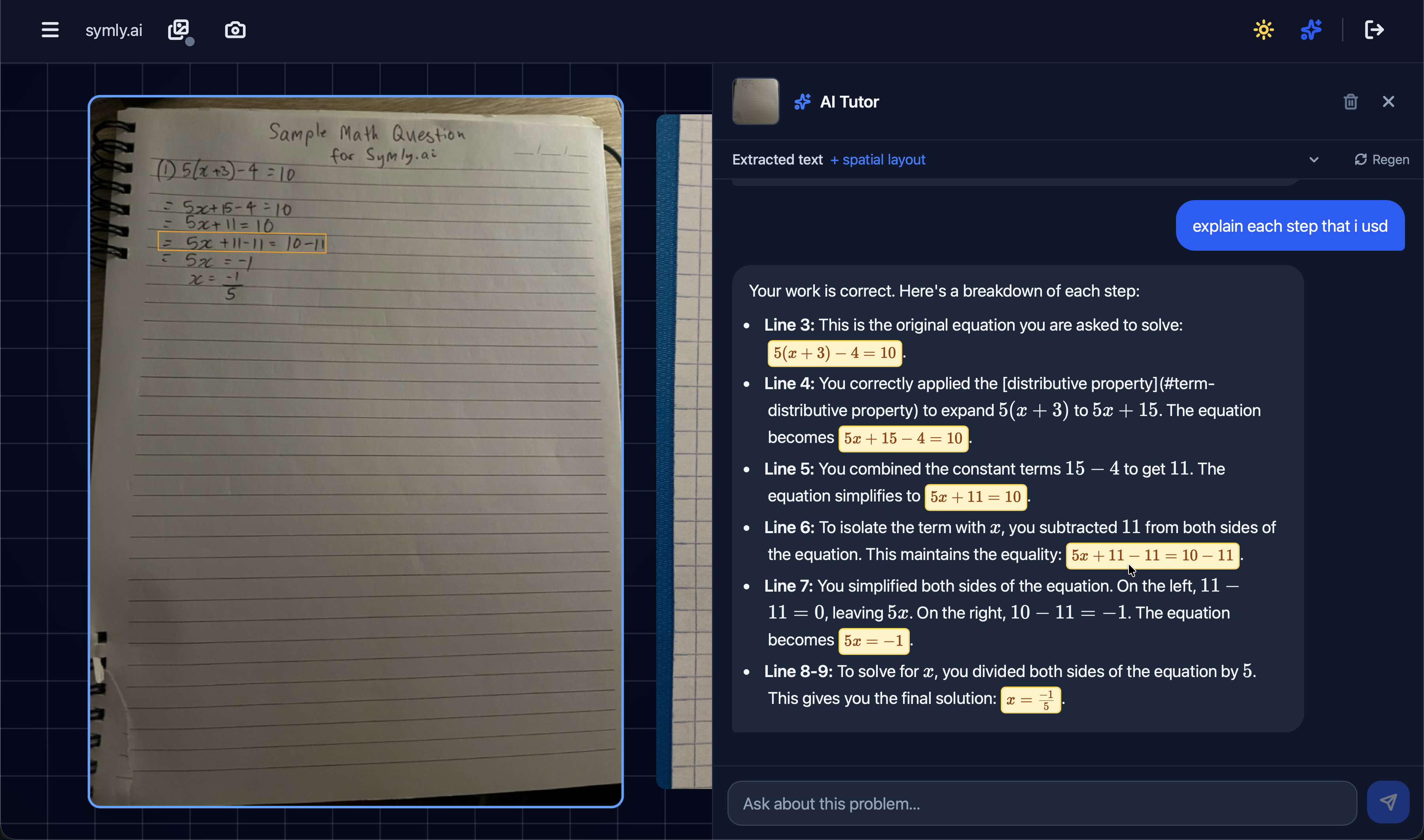
The project is archived and open source (MIT) for reference and local use. It reached a useful
prototype stage: the chat tutor understands page content well, but bounding-box step detection
remains incomplete on complex layouts.
Key Features
- Desk sessions — organize photos of handwritten work, reorder them, upload from desktop or phone via QR
- Hybrid OCR — Mathpix for high-quality LaTeX plus optional local PP-OCRv5 for per-line bounding boxes
- Expression steps — groups OCR boxes into logical math steps using Mathpix layout and Gemini structured output
- Spatial AI tutor — Gemini chat with a system prompt built from extracted text and layout; responses link to lines/steps and highlight regions
- Persistent chat — conversation history stored per desk image
Backend
Spring Boot REST API with a conventional layered layout: controllers expose HTTP endpoints,
services hold business logic, and JPA repositories persist to PostgreSQL. Resources are scoped
to user-owned sessions — every desk image, OCR result, and chat thread is verified against the
authenticated account before access.
- Auth — stateless JWT via a servlet filter; login/register are public, everything else requires a bearer token
- Sessions & desk — a session owns an ordered list of desk images; images are stored on disk and referenced by filename in the database
- OCR orchestration —
DeskServiceruns the hybrid pipeline, caches results on the desk image row, and serves them on demand (regenerate/clear endpoints for re-runs) - AI layer —
GeminiServicehandles two roles: structured JSON output for expression-step grouping, and conversational tutoring with a system prompt built from cached OCR text and spatial layout - Chat persistence — each user/assistant exchange is appended to ordered history per desk image; the frontend sends full context, the backend persists only the latest turn
- Phone upload — ephemeral upload keys let a phone POST images without a full login; a separate SSE stream pushes
image_uploadedevents to the desktop session in real time
Frontend
React 19 SPA (Vite + TypeScript + Tailwind) with a thin API layer and custom hooks that keep
the dashboard shell declarative. The core UX is a single workspace: pick a session, browse desk
photos, open the AI tutor against one image, and see spatial highlights when the model references
specific working.
- Routing —
/dashboard/s/:sessionIdfor the main workspace;/u/:uploadKeyfor the minimal phone-upload page - API client — shared base URL and JWT helper; domain modules (
sessionsApi,deskImageApi,ocrApi,chatApi) keep fetch logic out of components - Real-time sync —
useEventSourcesubscribes to SSE per active session so QR uploads appear in the desk strip without a refresh - Desk strip & image panel — reorderable thumbnails, blob URL hydration for previews, canvas-backed empty state while sessions load
- AI chat panel — slide-over tutor with react-markdown + KaTeX; parses tutor references to box/step IDs and draws polygon highlights over the desk image on hover or mention
- OCR debug UI — collapsible panels for raw boxes, Mathpix line data, and Gemini expression steps; useful for tuning the pipeline during development
OCR Pipeline
When local OCR is enabled:
- PP-OCRv5 detects text regions and polygon bounding boxes
- Mathpix extracts LaTeX for the full image
- Mathpix
line_datadefines semantic step regions; intersecting PP-OCR boxes are batched to Gemini - Gemini returns grouped steps (
boxIds+ LaTeX text) used for the debug UI and spatial chat references
What I Learned
- Combining commercial OCR (Mathpix) with local detection for spatial grounding
- Structured LLM output for layout-aware tutoring UX
- Full-stack session management with real-time upload flows (QR, SSE)
- Trade-offs on messy handwriting, multi-column worksheets, and dense matrix derivations
Status
Archived prototype. Available for local development — see the
README for setup.