Gesture Band
Overview
A field-service checklist concept designed to run on smart glasses and be controlled entirely
by custom wrist gestures - built for hands-free environments.
After researching sEMG and IMU-based gesture devices and finding limited off-the-shelf options,
I built a custom prototype: a 3D-printed wristband around an nRF52840, streaming 6-axis IMU
data over power-efficient BLE to a desktop training and demo stack.
The full loop - record gestures, export a training-ready dataset, train a compact classifier,
and navigate a live UI - takes only minutes of capture data. The model currently detects
four unique navigation gestures in real time.
The video shows a live capture session in Gesture Recording Studio, then the trained model
navigating the field-service checklist demo end-to-end: swipe to move between items, twist to
confirm, and shoo to go back.
Motivation
Smart-glass field workflows (checklists, work orders, step confirmation) need input that works
when both hands are occupied. Consumer wearables with usable open SDKs are scarce, and research
into sEMG armbands showed hardware cost and integration friction I wanted to avoid for a first
prototype. A wrist-mounted IMU band paired with a fast data-collection tool was the shortest
path to a demonstrable hands-free UI, built from scratch.
Hardware
- nRF52840 microcontroller with BLE UART streaming
- LSM6DS3 6-axis IMU - accelerometer and gyroscope at 100 Hz
- Madgwick sensor fusion for roll, pitch, and yaw alongside raw IMU samples
- Batched BLE notifications (5 samples per packet) to balance latency and radio duty cycle
- Custom 3D-printed wristband enclosure tuned for consistent sensor orientation
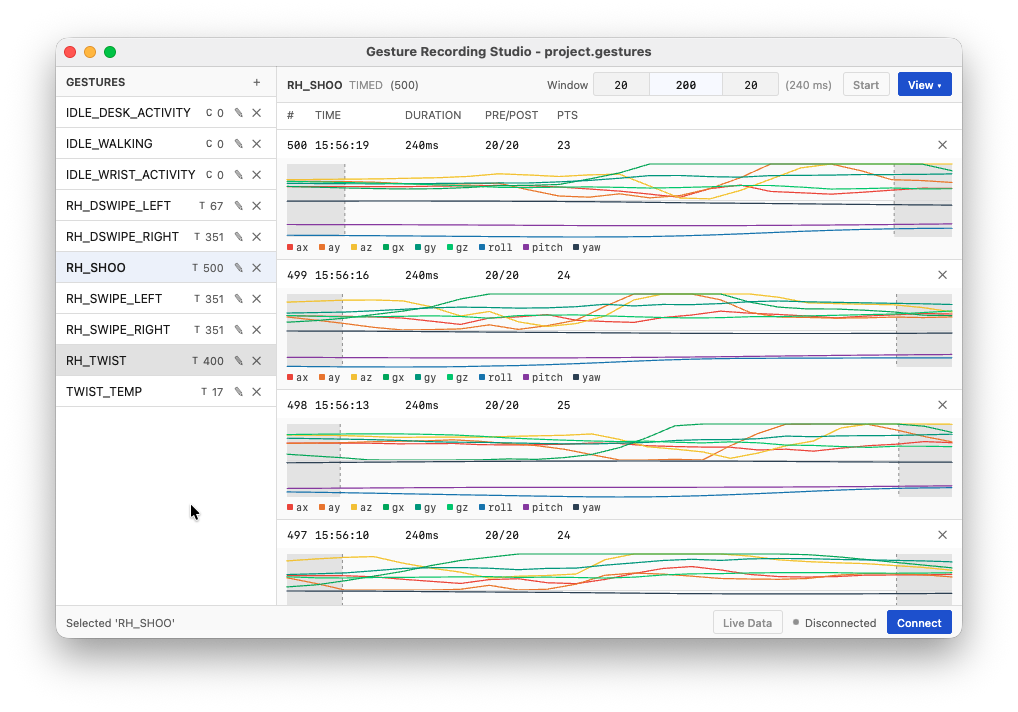
Gesture Recording Studio
A Kotlin Multiplatform Compose Desktop app for capturing and labelling IMU data:
- Project-based workflow: define gestures, record samples, manage existing datasets, export datasets
- Timed mode - fixed-duration event recordings (
rec_*) per gesture - Continuous mode - long captures (
cap_*) for idle and background motion - Live BLE connection to the band with sample preview during capture
- Export to CSV folders and a merged
dataset_all.csvready for model training
ML Pipeline
Training stays deliberately small so inference can run on constrained targets:
- 240 ms sliding windows (24 samples at 100 Hz) with 60 ms step
- Nine hand-crafted features per window - gyro/accel std, range, and axis dominance
- Multi-class logistic regression with balanced class weights and group-aware train/test splits
- Between 350-400 samples for each gesture, and approximately 40 minutes of varying non-gesture activity
- Per-gesture detector policies on softmax probabilities (majority vote, consecutive bursts, cooldowns)
- Model exported to JSON for device inference in Kotlin; Python path for prototyping
Gestures & Demo UI
Four navigation gestures drive a 640×360 Compose Desktop field-service mockup (smart-glass aspect):
- Swipe left / right - previous / next checklist item or screen
- Twist - select, open, or confirm
- Shoo - back / dismiss
The demo UI includes work-order lists, a procedure checklist with step completion, connection
status, and a gesture flash bar for live feedback. BLE inference runs in-process via the same
feature extraction and detector logic used in Python training.
System Design
test.ino— firmware: IMU read, Madgwick update, BLE batch transmitGesture-Recording-Studio/— KMP desktop app for capture, labelling, exportmodels/—train.py, sharedgesture_features.py, exportedgesture_model.jsonpython-inference/— BLE client, live inference, navigation demo UIDemo_Gesture_Desktop/— field-service Compose UI with embedded ML + BLE
Technical Challenges
- Separating intentional gestures from idle wrist motion (walking, desk work, fidgeting)
- Tuning per-gesture detector thresholds so one motion burst does not trigger multiple classes
- Designing a recording workflow fast enough that iterating on gestures takes minutes, not days
- Efficient BLE batching protocol to minimise device power consumption
What I Learned
- Timed clips (~240 ms) are enough for quick gestures like swipes; idle motion is easier to collect with continuous recordings
- Summarising each window into a handful of IMU stats (gyro variance, axis dominance, and similar) worked better than training on raw streams - less data to overfit, faster inference, and a model small enough to run on-device
- Keeping the BLE packet layout, window size, and feature code aligned between firmware, training, and inference avoids subtle bugs later
- Per-gesture cooldowns and vote windows reduce double-fires more reliably than chasing higher model accuracy alone
- Live testing on the band matters - a model that looks good in a CSV export can still feel unresponsive or overly responsive on the wrist
- For hands-free UI, a simple gesture flash or status indicator helps confirm input without needing to look closely at the screen
- Building the band and app together made it straightforward to assign specific gestures to specific actions only when required, instead of adapting a generic off-the-shelf input device
Current Status
- Working prototype band with 100 Hz IMU data with efficient batch streaming over BLE
- Gesture Recording Studio - timed and continuous capture with dataset management and exporting
- Four navigation gestures trained and running reliably in real time on desktop demo
- Kotlin and Python inference paths sharing the same feature and detector config
- Field-service checklist demo navigable entirely by wrist gestures, compatible with Android devices
- Air-writing letter input is a separate track — see Air Writing
Future Work
- Port inference fully to the band or a companion Android device
- Tighter coupling with the air-writing projection path in the same demo UI
- Vuzix / Android XR integration using the same gesture model
- Model inference integrated in Gesture Recognition Studio
- Dual IMU setup per hand, plus two-hand (multi-device) support in Gesture Recognition Studio
- Updated case with rechargeable battery connected
- Wider variety of human computer interface use-cases (e.g. non-verbal communication)